


Invidyo
4.367.00 Reviews
App Specs
- Version
- 2.4.0138
- Updated On
- License
- Free
- Downloads
- 10,000+
- Developer
- Invidyo Inc.
- Categories
- Video Players & Editors
- Platform
- Android
Screenshots
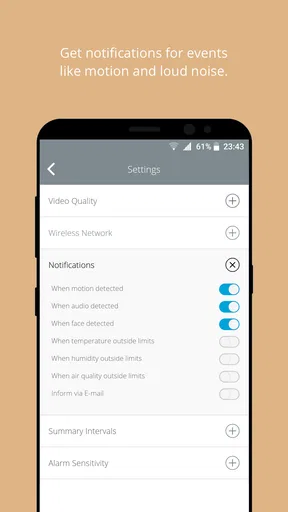
 Analysis by AppCompare
I look at Invidyo less as a general video player and more as a dedicated way to check in on a baby when I’m elsewhere. That distinction matters: parents choosing it are weighing reassurance and convenience, not just video playback. Invidyo is a free app from Invidyo Inc. in the video-player and editing category, though some in-app purchases range from $3.49 to $374.99 per item. Its average rating is 4.3 from 985 ratings, and it has over 10,000 installs. Those figures suggest an established, relatively focused audience, rather than the reach of a household-name camera platform.
What the monitoring workflow is for
The useful question is not simply whether I can open a live view, but whether checking in fits naturally into a normal day. A parent working in another room, or a caregiver who needs to keep an eye on a sleeping baby while doing a nearby task, may appreciate having monitoring and alerts together in one app. The same setup can help a parent who is away briefly stay connected, provided the camera and phone are set up and the network cooperates.
That convenience should not be mistaken for a substitute for attentive care. I’d treat alerts as prompts to check the situation, not as proof that everything is fine when no alert arrives. A baby monitor is most useful as one layer of awareness; it cannot make decisions for a caregiver or replace checking in person when something seems wrong.
Speed expectations and moments of heavier use
For this kind of app, speed is best judged by how quickly I can get to the view or respond to a notification, not by how many menus it has. Invidyo’s monitoring focus gives that everyday task priority, while live video, audio, alerts, and saved moments can make a session more demanding than simply opening a static screen. I would avoid assuming that every alert or video view will feel instant in every home: the phone, camera connection, and Wi-Fi all influence the experience.
Busy periods are where it helps to be deliberate. If I’m expecting to use the live feed while also receiving cry alerts or reviewing a daily summary, I’d first check that the phone is connected reliably and that I can reach the camera from the place I actually spend time. A quick test before relying on it is more useful than discovering a connection problem after leaving the room. It also helps to distinguish a delay caused by the network from a problem with the app itself.
Reliability, alerts, and sensible expectations
Monitoring works only when the full chain is dependable: the camera must be powered and connected, the home network must stay available, and the phone must be able to receive and display information. That means a useful setup includes a practical fallback. If I were responsible for a baby, I would keep the camera’s position and connection in mind and would not make the app my sole means of noticing a problem.
Smart detection can make checks less passive, but alerts are not the same as certainty. Room layout, sound, and activity can affect what a system picks up, so I’d learn how the notifications behave in my own space before relying on them during a busy stretch. A thoughtful approach is to use the feed when an alert arrives, then adjust expectations based on what I observe rather than assuming every event will be classified perfectly.
Worth Reading Before You Choose

EA SPORTS FC Mobile 26 Is a Bigger Football Game, but It Takes Time

Flipboard Shows What News Apps Must Do Beyond the Feed

Switching to Android Auto Means Rethinking Your Driving Routine

Google Calendar Makes a Crowded Week Easier to Manage

Ludo King Makes the Most of the Minutes Between Plans

Baby Panda World Brings Quick Play to Modern Phones, but Its Game Library Feels Busy
Device fit, cost, and who should look elsewhere
The app is rated Everyone and requires Android 5.0 or later, which makes it an option for a range of Android devices that meet that requirement. Still, an older compatible phone may not feel as responsive as a newer one, especially when handling live video. I’d check that the device I intend to use can comfortably run the app and that it will be available when monitoring matters. The current version is 2.4.0138.
Invidyo is a better fit for someone who wants a baby-monitoring workflow than for someone seeking a broad video editor or a basic camera viewer. A conventional camera app may suit a person who only needs occasional live viewing; a dedicated monitor with its own display may be preferable if they do not want to depend on a phone. The free download lowers the barrier to trying the app, but the range of optional purchases means I’d review any purchase screen carefully before committing. Its release date is November 28, 2013, and the app has accumulated 67 reviews alongside its ratings.
Have you ever wished you could keep an eye on your little ones even when you’re not at home? Well, I’ve got something cool to talk about today. I recently checked out Invidyo, a smart baby monitor app that promises to keep you connected with your baby, no matter where you are. Let me tell you all about it!
Setting Up Invidyo
First things first, getting started with Invidyo was super easy. All you need is to download the app from your app store, and you’re pretty much good to go. The app guides you through setting up the camera, which connects over Wi-Fi. Trust me, if I can do it, anyone can! The whole setup process took me less than 10 minutes.
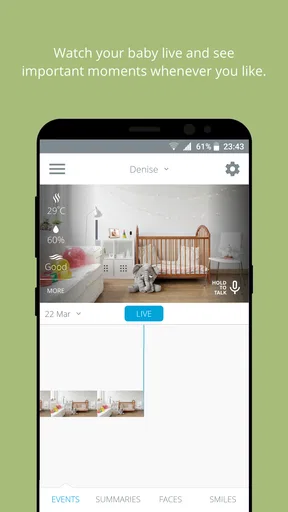
Once set up, you can access a live feed of your baby’s room right from your phone. The video quality is crisp and clear, even in low light, thanks to the night vision feature. It’s like peeking into your baby’s world, anytime you want.
Features That Stand Out
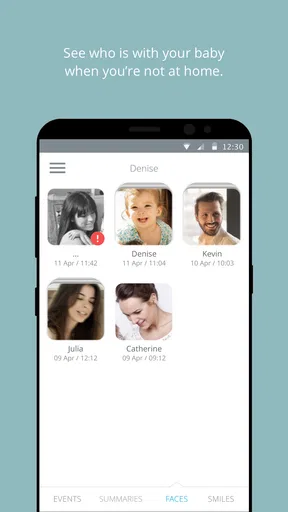
Alright, let’s talk features. What really caught my attention is the smart face detection. The app sends alerts when it sees someone new in the room. Plus, it can recognize smiles! Yes, you heard it right. Invidyo captures snapshots of cute moments and stores them, so you can enjoy those precious memories later.
Another feature I love is the cry detection. The app notifies you if your baby starts crying, so you can check in and see what’s up. And if you’re curious about what your baby’s day looked like, the app provides a daily summary video. It’s like getting a highlight reel of your baby’s adventures!
Staying Connected
The two-way audio functionality is a neat touch. It allows you to talk to your baby through the camera, which can be a comforting presence for both of you. I found it handy for soothing my little one back to sleep without having to enter the room.
And for those of us with busy schedules, the app’s integration with Alexa and Google Assistant is a lifesaver. It enables you to control the camera using voice commands, making multitasking a breeze.
The User Experience
I must say, the app interface is intuitive and user-friendly. Navigating through different features feels natural, and everything is easily accessible. The design is clean, which makes the overall experience pleasant. I didn’t encounter any significant glitches or lags, which is a huge plus!
One thing I appreciate is the app’s security measures. The developers have taken steps to ensure your data is safe, with encrypted video streams and a secure account setup. It’s reassuring to know that privacy is a priority here.
Final Thoughts
In the sea of baby monitor apps, Invidyo definitely stands out. It’s packed with features that make keeping an eye on your baby not just easy, but also enjoyable. From smart alerts to capturing those adorable moments, it’s like having an extra pair of eyes that never blink.
If you’re a parent looking for a reliable way to stay connected with your little one, I’d say give Invidyo a try. It’s not just about monitoring; it’s about being part of your baby’s day, even from afar. And that’s something every parent can appreciate.
Pros
- User-friendly interface for easy navigation.
- Comprehensive monitoring features available.
- Instant alerts for unusual activities.
- High-quality video streaming capabilities.
- Seamless integration with smart devices.
Cons
- Subscription required for premium features.
- Limited free trial duration.
- Occasional connectivity issues.
- App updates can be slow to release.
- Video storage limits without upgrade.
FAQs for Invidyo
What is Invidyo and what features does it offer?
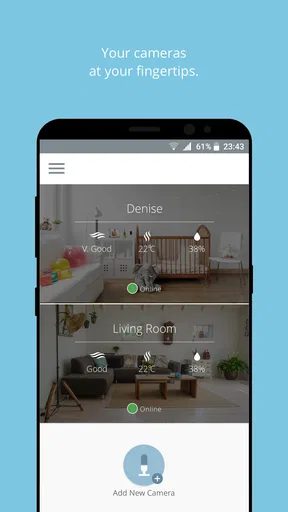
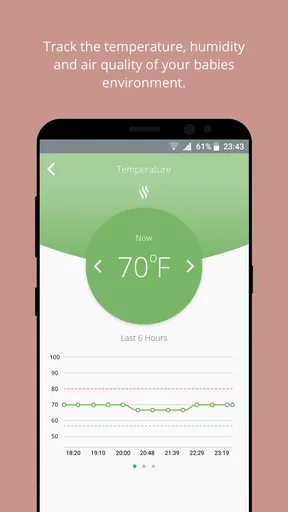
Invidyo is a smart baby monitor app that provides real-time video streaming, motion and sound detection, and temperature and humidity monitoring. It also offers AI-based facial recognition to identify familiar faces and strangers, ensuring your child's safety. Additionally, it features a timeline of daily highlights, allowing you to review important moments easily.
Is Invidyo compatible with all devices?
Invidyo is compatible with both Android and iOS devices. Users need to ensure their device meets the minimum system requirements for the app to function smoothly. Additionally, Invidyo works with its proprietary camera, which needs to be purchased separately to access all features.
How secure is the Invidyo app?
Invidyo prioritizes user privacy and security by implementing end-to-end encryption for video streams. This ensures that all data shared via the app is secure and accessible only by authorized users. Additionally, regular updates are provided to enhance security features and protect against potential vulnerabilities.
Are there any subscription fees for using Invidyo?
While the Invidyo app itself is free to download, it offers various subscription plans to access premium features like cloud storage for video recordings and advanced AI functionalities. Users can choose a plan based on their needs, and a free trial period is often available to explore these features.
What should I do if I encounter issues with Invidyo?
If you experience any problems with Invidyo, the app provides a comprehensive support section with troubleshooting guides. Users can also contact customer support through email or live chat for prompt assistance. Regular updates from the developers often address common issues and improve overall app performance.


